
ResMed AirSense 10 AutoSet : Dépannage clinique et guide d’utilisation
L'appareil CPAP AirSense 10 AutoSet est largement utilisé pour la gestion à long terme de l'apnée obstructive du sommeil. Conçu pour une utilisation nocturne sur plusieurs années, le système intègre l'automatisation de la pression, l'humidification et le suivi des données de traitement.
Malgré sa fiabilité, les utilisateurs peuvent occasionnellement rencontrer des problèmes liés au débit d'air, à l'humidité, à la perception de la pression ou au comportement de l'appareil. La plupart de ces situations sont des réponses opérationnelles attendues plutôt que des pannes d'équipement.
Ce guide aborde les préoccupations concernant l'AirSense 10 par schéma symptomatique, expliquant pourquoi elles surviennent et comment elles sont généralement traitées en pratique clinique.

Comportement du débit d'air pouvant sembler inhabituel
L'appareil continue de fonctionner après l'arrêt du traitement
Certains utilisateurs remarquent que le débit d'air continue même après avoir retiré leur masque. Il s'agit d'une fonction normale après le traitement.
Après la fin d'une séance, l'AirSense 10 peut continuer à faire circuler l'air en interne pour réduire l'humidité résiduelle. Cela permet de limiter la condensation à l'intérieur du tuyau et du boîtier de l'appareil.
Ce que cela signifie cliniquement :
- La machine protège les composants internes
- Le débit d'air devrait s'arrêter de lui-même dans les 30 minutes environ
- Aucun dépannage n'est nécessaire
L'appareil ne commence pas à souffler de l'air immédiatement
Si la machine semble inactive au démarrage du traitement, elle peut être en mode veille ou attendre un débit d'air suffisant pour déclencher le SmartStart.
Étapes à vérifier :
- Appuyez sur le bouton Accueil ou tournez le cadran de commande
- Confirmez que l'alimentation électrique est entièrement connectée
- Assurez-vous que les filtres ne sont pas obstrués
- Vérifiez que l'appareil n'est pas en mode avion
Problèmes liés à l'humidité, à la condensation et à l'eau
Présence d'eau à l'intérieur du tuyau ou du masque
L'humidité à l'intérieur du tuyau ou du masque est généralement causée par les différences de température entre l'air humidifié et la pièce environnante. Lorsque l'air chaud se refroidit rapidement, de la condensation se forme et s'accumule le long du tuyau.
Facteurs contributifs courants :
- Paramètres d'humidité élevés
- Températures de chambre froides
- Tuyau standard (non chauffé)
Ajustements cliniques souvent recommandés :
- Réduire légèrement l'humidité
- Augmenter la température du tuyau si un tuyau chauffant est utilisé
- Passer le tuyau sous la literie pour stabiliser la température
- Positionner l'appareil plus bas que le niveau du matelas
Masque mouillé ou humidité sur le visage
Un excès d'humidité peut entraîner la formation de gouttelettes d'eau directement à l'intérieur du masque, provoquant un inconfort ou des troubles du sommeil.
Une légère réduction de l'humidité est généralement suffisante. Un tuyau chauffant peut également aider à maintenir une température d'air constante dans le circuit.
Fuite d'eau de la base de l'appareil
L'eau sous la machine provient généralement de la chambre d'humidification.
Cela peut se produire lorsque :
- La chambre n'est pas entièrement insérée
- Le réservoir est trop rempli
- Une petite fissure permet à l'eau de s'échapper
Retirer la chambre, sécher la zone et la réinsérer correctement résout souvent le problème. Les fuites persistantes indiquent généralement un dommage de la chambre et nécessitent son remplacement.
Problèmes liés au masque
Fuite d'air autour du joint du masque
Les fuites d'air sont le plus souvent liées à l'ajustement plutôt qu'à la pression ou à un dysfonctionnement de l'appareil.
Les considérations cliniques incluent :
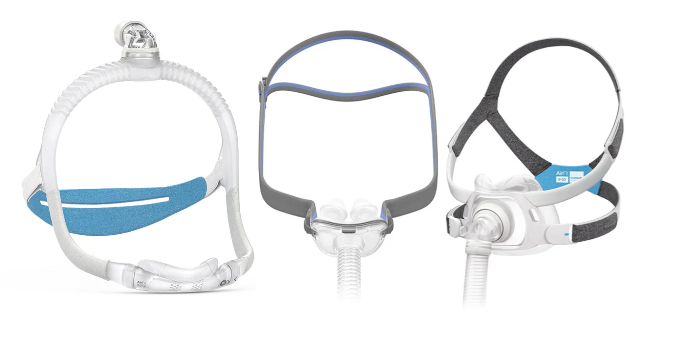
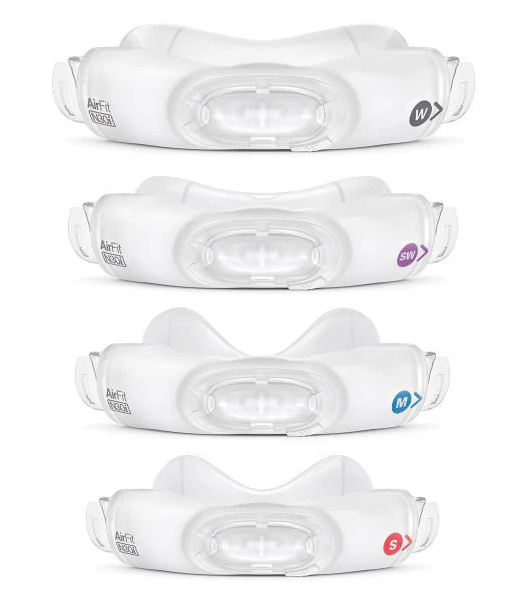
- Taille et style du masque
- Tension de la sangle
- Usure du coussinet
Les masques doivent être ajustés en position allongée, car la structure faciale change en position inclinée. Un serrage excessif aggrave souvent les fuites plutôt que de les résoudre.
Bouche sèche pendant le traitement
La bouche sèche résulte généralement d'une respiration buccale involontaire pendant le sommeil, en particulier lors de l'utilisation de masques nasaux.
Les stratégies de gestion peuvent inclure :
- Augmentation de l'humidification
- Utilisation d'une mentonnière
- Passer à un masque facial intégral si la respiration buccale persiste
Sécheresse nasale ou congestion
L'irritation nasale peut survenir lorsque l'humidification est insuffisante pour l'environnement de l'utilisateur ou le type de masque.
Une augmentation progressive de l'humidité ou l'utilisation d'un tuyau à température contrôlée peut aider à rétablir le confort sans introduire d'humidité excessive.
Sensations de pression incorrectes
Pression excessive
Une sensation de haute pression n'indique pas toujours des réglages incorrects. L'AirSense 10 peut temporairement augmenter la pression pour répondre à des événements ou compenser des fuites.
Facteurs influençant la perception de la pression :
- Paramètres de rampe
- Libération de pression expiratoire (EPR)
- Qualité du joint du masque
L'EPR peut réduire la pression pendant l'expiration, améliorant le confort sans compromettre l'efficacité du traitement.
Pression trop basse
Une basse pression est couramment ressentie pendant la phase de rampe, qui démarre intentionnellement le traitement à un niveau réduit.
Si cette sensation persiste après la fin de la période de rampe, les réglages de pression prescrits devront peut-être être réexaminés avec le médecin du patient.
Problèmes d'affichage et d'alimentation
Écran sombre ou non réactif
Un écran sombre est souvent causé par l'extinction du rétroéclairage ou le passage de l'appareil en mode veille.
Si l'écran ne répond pas :
- Appuyez sur le bouton Accueil ou sur le cadran
- Confirmez les connexions d'alimentation
- Inspectez le port d'alimentation arrière pour détecter tout desserrement
Des problèmes d'alimentation persistants peuvent indiquer un défaut électrique interne nécessitant une évaluation de service.
Messages d'erreur et usure à long terme
Bien que ces alertes apparaissent le plus souvent après une utilisation prolongée, il est important de noter que, dans de rares cas, des messages d'erreur similaires peuvent également survenir au début de la vie de l'appareil. Certaines alertes reflètent l'usure normale des composants, tandis que d'autres peuvent indiquer un problème matériel. Si une erreur persiste après le redémarrage de l'appareil, veuillez nous contacter afin que nous puissions examiner le problème et vous conseiller sur les étapes suivantes.
|
Message d'erreur |
Ce qu'il indique |
Action recommandée |
|
Durée de vie du moteur dépassée |
L'appareil a atteint environ 21 900 heures d'utilisation du ventilateur. |
L'appareil a atteint la fin de sa durée de vie et doit être remplacé. |
|
Connecteur d'alimentation non entièrement inséré |
Le cordon d'alimentation n'est pas entièrement inséré ou le joint du port arrière peut être endommagé. |
Poussez et tournez fermement le connecteur. Si le problème n'est pas résolu, contactez le support technique de CPAP Outlet. |
|
Connecteur d'alimentation / Carte SD corrompus |
La carte SD est endommagée ou corrompue. |
Reformatez la carte SD ou remplacez-la si nécessaire. |
|
Fuite importante détectée |
Fuite d'air excessive du masque, du tuyau ou de la chambre d'humidification. |
Vérifiez le joint du masque, les connexions du tuyau et le placement de la chambre. |
|
Défaut du système de chauffage |
Dysfonctionnement de la plaque chauffante ou de la carte de commande interne. |
Contactez le support technique de CPAP Outlet pour le service de garantie. N'essayez pas de réparer. |
|
Défaut système |
Défaut matériel général détecté par l'appareil. |
Redémarrez l'appareil. Si l'erreur persiste, contactez le support technique de CPAP Outlet. |
|
Erreur 001 |
Défaut du moteur du ventilateur ou du capteur de pression. |
Contactez le support technique de CPAP Outlet pour le service de garantie ou le remplacement. |
|
Erreur 002 / 003 |
Dysfonctionnement du capteur de pression. |
Contactez le support technique de CPAP Outlet pour le service de garantie ou le remplacement. |
|
Erreur 004 |
Surchauffe de la carte de commande principale. |
Éteignez et laissez l'appareil refroidir. Si cela se répète, contactez le support technique de CPAP Outlet. |
|
Erreur 005 |
Haute tension détectée au niveau du moteur du ventilateur. |
Contactez le support technique de CPAP Outlet pour une évaluation de la garantie. |
|
Erreur 006 |
Blocage du moteur du ventilateur détecté. |
Contactez le support technique de CPAP Outlet pour le service de garantie ou le remplacement. |
|
Erreur 007 / 008 |
Défaillance du moteur du ventilateur. |
Contactez le support technique de CPAP Outlet pour le service de garantie ou le remplacement. |
|
Erreur 009 |
Défaut de la carte de commande principale. |
Contactez le support technique de CPAP Outlet pour le service de garantie. |
|
Erreur 010 / 011 |
Le capteur de débit est bloqué. |
Contactez le support technique de CPAP Outlet pour le service de garantie. |
|
Erreur 012 |
Le capteur de débit ne transmet pas de données. |
Contactez le support technique de CPAP Outlet pour le service de garantie. |
|
Erreur 013 |
Lecture incorrecte du capteur de pression. |
Redémarrez l'appareil. Si le problème n'est pas résolu, contactez le support technique de CPAP Outlet. |
|
Erreur 017 |
Erreur de données logicielles. |
Contactez le support technique de CPAP Outlet pour le service de garantie. |
|
Erreur 018 |
Erreur de données de calibrage. |
Redémarrez l'appareil. Si le problème persiste, contactez le support technique de CPAP Outlet. |
|
Erreur 019 |
Défaillance matérielle interne non spécifique. |
Contactez le support technique de CPAP Outlet pour une évaluation de la garantie. |
|
Erreur 020 |
Dysfonctionnement du capteur de débit. |
Contactez le support technique de CPAP Outlet pour le service de garantie. |
Meilleures pratiques cliniques pour une utilisation continue
Gardez le modèle et le numéro de série de l'appareil à portée de main. Ces informations sont nécessaires pour la vérification de la garantie et le support technique. Placez l'appareil sur une surface stable et plane pour assurer une bonne circulation de l'air et une transmission des données.
Quand consulter un professionnel de la santé
Si l'inconfort lié à la thérapie, la sécheresse ou les troubles du sommeil persistent malgré les ajustements de routine, un soutien supplémentaire peut être nécessaire. Pour les problèmes liés aux appareils CPAP achetés chez CPAP Outlet, veuillez contacter notre équipe du service client. Nous examinerons le problème avec vous et vous guiderons à travers les étapes suivantes, y compris le support de garantie du fabricant ou le remplacement si nécessaire.
La plupart des appareils CPAP sont assortis d'une garantie du fabricant de 3 ans.
Support technique de CPAP Outlet
Téléphone : 1-855-542-CPAP (2727)
Courriel : info@cpapoutlet.ca
Conclusion
Le ResMed AirSense 10 est conçu pour une thérapie CPAP fiable et à long terme, et la plupart des problèmes rencontrés par les utilisateurs sont liés au comportement normal de l'appareil, à la gestion de l'humidité, à l'ajustement du masque ou aux paramètres de confort plutôt qu'à une défaillance de l'équipement. Comprendre comment l'appareil réagit au flux d'air, à l'humidité et aux changements de pression permet aux utilisateurs de résoudre les problèmes plus efficacement et d'éviter les interruptions inutiles de la thérapie.
Une attention régulière à la configuration, aux ajustements de confort et à l'entretien de routine assure des performances constantes et un traitement efficace. Avec une compréhension claire de ces schémas courants, la thérapie CPAP devient plus facile à gérer et plus prévisible au fil du temps.