
Comment modifier la pression sur l'appareil de PPC de voyage ResMed AirMini (Guide du menu clinique)

Si vous utilisez la machine CPAP de voyage ResMed AirMini AutoSet, la plupart des réglages sont contrôlés via l'application AirMini.
Cependant, il existe également un menu clinique caché qui permet d'accéder à des paramètres de thérapie avancés. Ce guide vous explique comment y accéder et ce que chaque paramètre signifie et comment ils fonctionnent ensemble.
Étape 1 : Téléchargez l'application AirMini

Commencez par télécharger l'application AirMini sur votre smartphone :
Une fois installée, ouvrez l'application et commencez la configuration.
Étape 2 : Connectez votre AirMini à l'application

Suivez le processus de configuration :
- Ouvrez l'application et passez l'écran d'accueil
- Appuyez sur le bouton Bluetooth de votre appareil AirMini
- Confirmez la connexion dans l'application
- Saisissez le numéro de série de l'AirMini (situé à l'arrière de l'appareil)
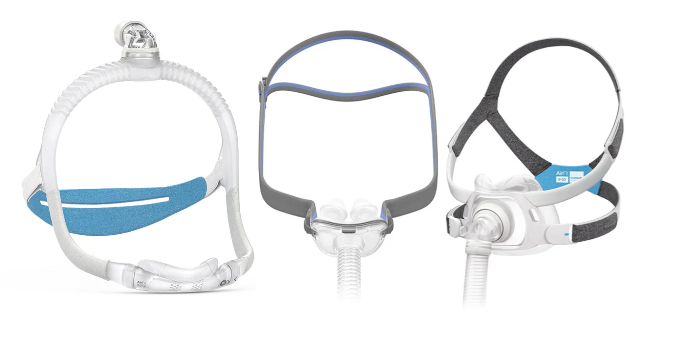
- Sélectionnez votre type de masque :
- Pack masque ResMed AirMini P10 pour AirMini
- Pack masque ResMed AirFit N30 pour AirMini
- ResMed AirFit N20 / AirTouch N20 (nécessite un pack d'installation N20 séparé)
- ResMed AirFit F20 / AirTouch F20 (nécessite un pack d'installation F20 séparé)
- ResMed AirFit F30 (nécessite un pack d'installation F30 séparé)
Une fois terminé, votre AirMini sera jumelé et prêt.
Étape 3 : Accédez au menu clinique

Pour déverrouiller les paramètres cliniques :
- Attendez que l'application affiche les logos ResMed et AirMini
- Placez un doigt sur chaque logo
- Maintenez pendant environ 3 secondes
Cela ouvrira le menu clinique.
Si les logos n'apparaissent pas :
- Appuyez sur l'icône Bluetooth dans l'application
- Revenez à l'écran
- Réessayez
Étape 4 : Effectuez des modifications et enregistrez
- Ajustez les réglages nécessaires
- Sélectionnez Appliquer pour enregistrer les modifications
Rappel important
N'ajustez les réglages qu'en fonction de votre thérapie prescrite.
Les modifications de pression ou de modes de thérapie doivent toujours être confirmées par votre médecin ou votre spécialiste du sommeil.
Comprendre les paramètres cliniques de l'AirMini
Une fois dans le menu clinique, le réglage le plus important à comprendre est le Mode, car il contrôle le comportement de la machine et les autres réglages qui apparaissent.
Mode thérapie (contrôle tous les autres réglages)
Mode CPAP (pression fixe)
- Délivre une pression constante toute la nuit
- Pas d'ajustements automatiques
Lorsque le mode CPAP est sélectionné :
- La pression est réglée sur une seule valeur
- Les réglages de pression minimale et maximale ne sont pas utilisés
- Le réglage de la réponse n'est pas disponible
Mode AutoSet
- Ajuste automatiquement la pression tout au long de la nuit
- Réagit aux changements respiratoires tels que les apnées, la limitation du flux et le ronflement
Lorsque AutoSet est sélectionné :
- Vous définissez une plage de pression
- Pression minimale
- Pression maximale
- La pression s'ajuste dans cette plage
Plage typique :
4,0 à 20,0 cmH₂O, ajustable par incréments de 0,2
Mode AutoSet pour elle
- Utilise un algorithme ResMed modifié
- Ajuste la pression plus progressivement et en douceur
Comparé à l'AutoSet standard :
- Augmentations de pression plus lentes
- Moins de changements brusques pendant le sommeil
Ce mode est souvent préféré pour :
- Les utilisateurs sensibles aux changements de pression
- Les dormeurs légers
Le réglage de la réponse n'est pas disponible dans ce mode, car le comportement plus doux est déjà intégré à l'algorithme.
Paramètres de pression (Modes automatiques uniquement)
Ces réglages n'apparaissent que lorsque vous utilisez AutoSet ou AutoSet for Her.
Pression minimale
- La pression de départ
- La pression la plus basse que la machine délivrera
Pression maximale
- La limite supérieure de pression
- Empêche la pression de dépasser un niveau défini
La machine ajuste automatiquement la pression entre ces deux valeurs pendant la nuit.
Réponse (AutoSet uniquement)
Ce réglage contrôle la vitesse des changements de pression.
- Standard
- Réponse plus rapide aux événements respiratoires
- Ajustements de pression plus actifs
- Doux
- Augmentations de pression plus lentes et plus progressives
- Sensibilité réduite aux changements
Cette option n'est disponible qu'en mode AutoSet.
Temps de rampe
La rampe contrôle la façon dont la thérapie commence et la rapidité avec laquelle la pression augmente.
Options disponibles :
- Désactivé
- 5 à 45 minutes (par intervalles de 5 minutes)
- Auto (AutoRampe)
Comment cela fonctionne :
- En AutoSet → démarre à votre pression minimale
- En CPAP → démarre à une pression plus basse et augmente progressivement jusqu'à votre pression fixe
- La rampe temporisée augmente progressivement la pression sur la durée sélectionnée
- L'AutoRampe maintient une pression de départ plus basse (basée sur votre pression minimale) et augmente une fois que le sommeil est détecté en fonction de votre respiration
La rampe est une fonction de confort et ne modifie pas votre pression prescrite.
EPR (Expiratory Pressure Relief)
L'EPR réduit la pression lorsque vous expirez, rendant la respiration plus confortable.
Niveaux :
- Désactivé
- 1 (faible soulagement)
- 2 (soulagement modéré)
- 3 (soulagement maximal)
Type d'EPR :
- Rampe uniquement → actif uniquement pendant la rampe
- Temps plein → actif tout au long de la thérapie
Si la rampe est désactivée et l'EPR réglé sur Rampe uniquement, l'EPR ne restera pas actif pendant la thérapie.
Réglage du type de masque
Cela garantit que la machine est calibrée correctement en fonction de votre masque.
Les options incluent :
- Nasal
- Coussinets nasaux
- Facial complet
Associez toujours ce réglage au masque que vous utilisez.
SmartStart et SmartStop
SmartStart
- Démarre automatiquement la thérapie lorsque vous commencez à respirer
SmartStop
- Arrête automatiquement la thérapie lorsque le masque est retiré
Ce sont des fonctionnalités de commodité qui peuvent être activées ou désactivées.
Quand faut-il ajuster les réglages ?
Vous pouvez ajuster les réglages de confort selon vos préférences :
- Temps de rampe
- Niveau EPR
- Réponse (AutoSet uniquement)
Cependant, ces éléments ne doivent pas être modifiés sans avis médical :
- Mode thérapie
- Réglages de pression (niveau Min / Max / CPAP)
Point clé à retenir

Accéder au menu clinique de la machine CPAP de voyage ResMed AirMini AutoSet est simple une fois que vous connaissez les étapes :
- Connectez-vous via l'application
- Utilisez le maintien à deux doigts pour déverrouiller le menu
- Comprenez comment le Mode contrôle le reste des paramètres
- N'ajustez que ce qui est approprié
- Enregistrez toujours vos modifications
Une compréhension claire de ces réglages garantit que votre traitement reste à la fois confortable et efficace.